Configuration
FlightDeck layers two TOML files into one effective config. This page explains the layering and the in-app configuration manager; the Configuration reference documents every key.
Two layers
~/.flightdeck/config.toml       # per-user GLOBAL base (all settings, documented)
<repo>/.flightdeck/config.toml  # per-project OVERRIDE (only changed values)
- The global file is created on first run with every setting present and commented, so it's clear what you can change.
- Each project file stores only the values it overrides — everything else is inherited from the global base.
How layering resolves
The project layer wins field by field over global, which wins over the shipped defaults. Sub-tables merge recursively.
The configuration manager
Open the command palette (Ctrl-g) and choose Open Configuration to edit
the common settings without leaving FlightDeck. It opens in Project scope by
default (falling back to Global if the project has no config file yet).
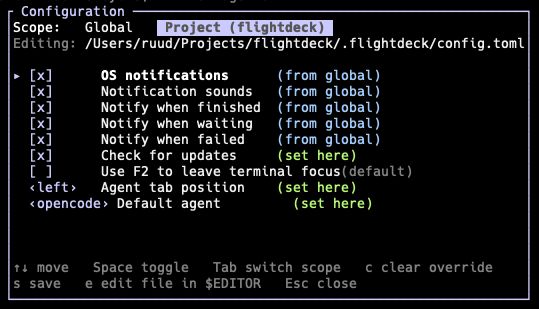
The configuration manager — toggle settings and see where each value comes from.
Keys:
↑/↓— move between settings,Space— toggle a boolean, cycle a choice, or start editing a text field (e.g. the relay URL — type to edit,Entersaves,Esccancels),Tab— switch between Global and Project scope (the header always names the file and project you're editing),c— clear a project override so the value re-inherits from global,s— save (and reload every open project's effective config immediately),e— open the rawconfig.tomlin$EDITORfor the full surface (containers, agents, Git, …).
Each row shows its origin: set here, from global, or default, so you always know why a value is what it is.
Curated settings
The manager exposes the settings you change most often:
| Setting | Key |
|---|---|
| OS notifications | notifications.enabled |
| Notification sounds | notifications.sound |
| Notify when finished / waiting / failed | notifications.on_finish / on_waiting / on_failed |
| Check for updates | update.check |
| Use F2 to leave terminal focus | ui.use_f2_to_leave_terminal_focus |
| Agent tab position (left / right) | ui.agent_tab_position |
| Default agent | ui.default_agent |
| Option as Meta (macOS desktop app) | ui.macos_option_as_meta |
| Terminal font size (desktop app) | ui.desktop_terminal_font_size |
| FlightDeck Remote (phone link) | remote.enabled |
| Relay URL | remote.relay_url |
| Phone done-push delay (seconds) | remote.push_done_debounce_secs |
For everything else — Git remote and host, branch prefix, worktree root,
containers, and custom agents — edit config.toml directly (press e), and see
the full reference.
What's committed
The project .flightdeck/config.toml is meant to be committed and shared with
your team; runtime state (state.json, worktrees/, runtime/) is
.gitignored automatically. Your personal preferences live in the global file,
outside the repo.
Hooks
A separate per-repo file, .flightdeck/hooks.toml, runs shell commands at points
in a worktree's lifecycle (for example, npm install in every new worktree).
Unlike config.toml, it is .gitignored by default so hooks stay opt-in per
machine. See Hooks for the full reference.