Git Workflow
FlightDeck is built around Git worktrees, and it takes a deliberately conservative stance: it helps you branch, push, and merge, but it never rewrites history on its own. This page covers every Git operation and the safety boundary behind them.
The git strip
In the Desktop app, the git strip along the bottom of the window summarizes the selected agent's worktree and holds the Pull base, Finish and Push buttons for the operations below. The terminal UI shows the same summary as one line just above its status bar, whether the agent or a shell is focused:
⎇ flightdeck/fix-login │ +3 ~2 -1 (6 files) │ ↑0 ↓0 │ base +12 │ base: main
- Branch — the worktree's branch.
- Change counts —
+added ~modified -deleted (N files), orclean. - Ahead / behind — versus the upstream, or
no upstreamuntil the branch is pushed. - Base drift — how many commits the base has moved since the tab was created.
- Base — the base branch.
Git status
For the full picture, open the command palette (Ctrl-g) and choose Show Git
Status. It reports the branch, base branch, dirty/clean state, per-category
change counts, ahead/behind, whether an upstream exists, base drift, the
worktree path, and — once pushed — the PR compare URL.
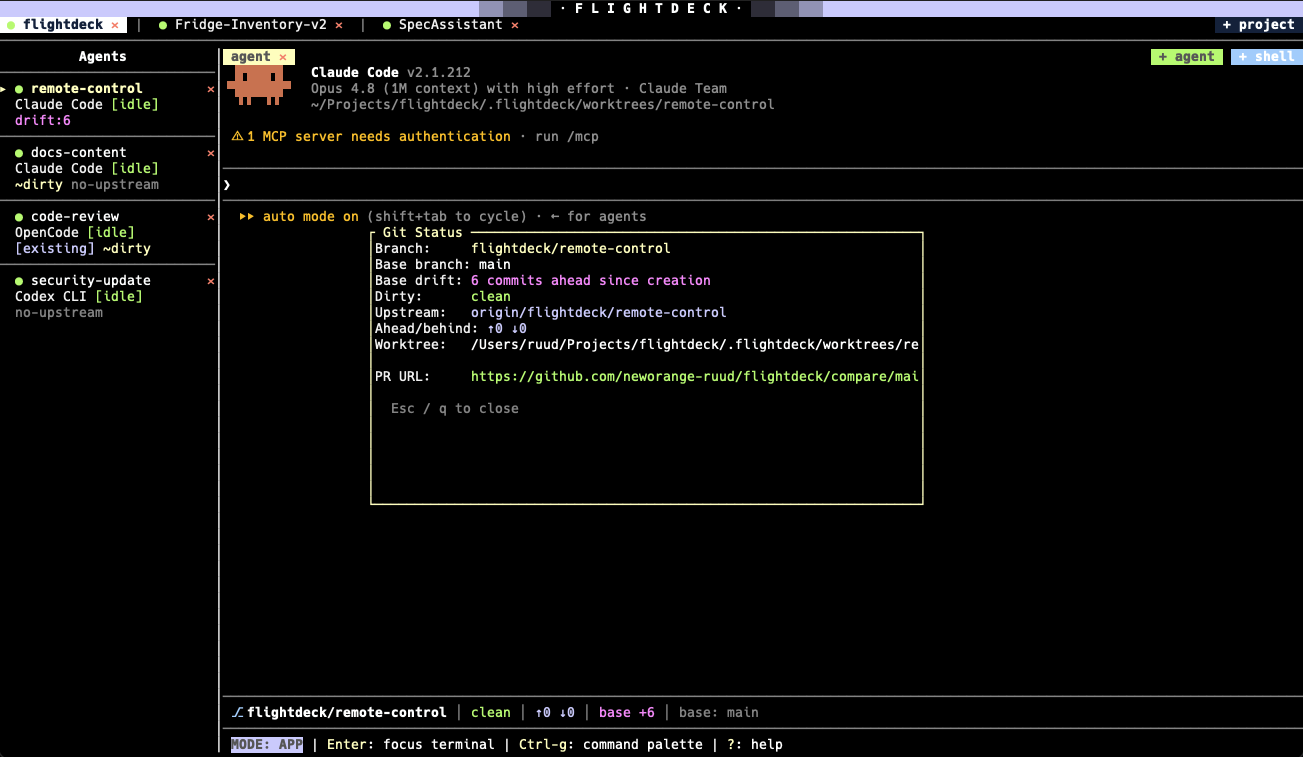
Show Git Status — a complete read-only view of the selected worktree.
Push a branch
Press Ctrl-p (palette → Push Branch) to push the current worktree's
branch. Push is non-force and always confirmed.
- If the worktree has uncommitted changes, FlightDeck warns you first (only committed work is pushed) and offers Push committed or Cancel.
- On success, if your remote is GitHub, FlightDeck prints a PR compare URL:
https://github.com/<owner>/<repo>/compare/<base>...<branch>.
Pull base
After a PR merges, bring your local base branch up to date with Ctrl-u
(palette → Pull Base). This runs git pull --rebase on the base folder
(your repo root). It:
- requires the base branch to be checked out at the repo root,
- refuses to run if the base folder is dirty,
- aborts cleanly on conflict, leaving the base folder untouched.
Finish / local merge
When an agent's work is done and you want it in your local base without a
PR, use Ctrl-f (palette → Finish / Local Merge). This is a guarded
merge-back with strict preconditions:
- the base worktree is clean,
- the agent worktree is clean,
- both branches exist and the base SHA is known,
- you confirm explicitly.
A running agent does not block it (the merge operates on committed refs). On success FlightDeck stops the session, removes the worktree, and closes the tab. On conflict it stops and leaves the worktree intact for you to resolve manually.
Rebase a worktree
Rebasing is the one sanctioned history rewrite, and it is palette-only (no shortcut): command palette → Rebase Worktree. It rebases the agent branch onto its local base branch. It:
- always confirms first (the dialog shows the branch, base, drift, and whether the agent is running),
- requires a clean worktree and both branches present,
- aborts on conflict, leaving the worktree exactly as it was,
- advances the stored base SHA on success,
- runs the repo's
worktree_updatehook in the rebased worktree on success, if one is configured.
Abandon a worktree
Command palette → Abandon Worktree removes a managed worktree. It always confirms first, even when the worktree is clean. If the worktree has uncommitted changes, the confirmation warns that they will be discarded before the worktree is force-removed. The branch itself is kept.
The safety boundary
This is enforced by construction — the operations FlightDeck cannot do are not even available to its Git layer, and a build-time guard fails the build if a forbidden Git command ever appears in the source.
| FlightDeck may | FlightDeck may not |
|---|---|
| Detect repo root, base, dirty state | Stage files or make commits |
Create .flightdeck/, append .gitignore | Amend or squash commits |
| Create & attach branches | Rebase automatically |
| Create & recover worktrees | Force-push |
| Push a branch (after you confirm) | Open GitHub PRs |
| Guarded local merge-back | Auto-resolve merge conflicts |
| Confirmed rebase, base pull | Rewrite history on its own |
You — or your agent — make every commit. That's what keeps FlightDeck safe to point at real repositories.