Terminals & Split View
Each agent tab has one primary agent terminal, and you can open extra shells beside it in the same worktree. This page covers child terminals and split view.
Child terminals
A child terminal is a plain shell running in the selected agent's worktree. It shares the worktree with the primary agent but runs independently — perfect for running tests, inspecting files, or making a manual commit while the agent keeps working.
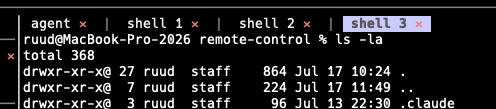
The terminal tab row: the primary agent plus shell 1, shell 2, and the + agent / + shell buttons.
- Open a shell —
Ctrl-t(palette → New Child Terminal / Open Shell). - Switch terminals —
Alt-←/Alt-→, or click a terminal tab. In app mode, bare←/→also work. - Close a shell —
Ctrl-w(palette → Close Child Terminal). Closing is always confirmed first.
The terminal tab row shows agent | shell 1 | shell 2 … with + agent and
+ shell buttons on the right and a ✕ on each tab.
If the project runs agents in containers, child shells
exec into the same container as the agent, so they share its environment.
Split view
By default the agent terminal and its child shells are stacked as tabs. Toggle
split view with Ctrl-b (palette → Toggle Split View) to lay them out
side by side in equal-width columns instead — useful for watching an agent while
you run commands next to it.
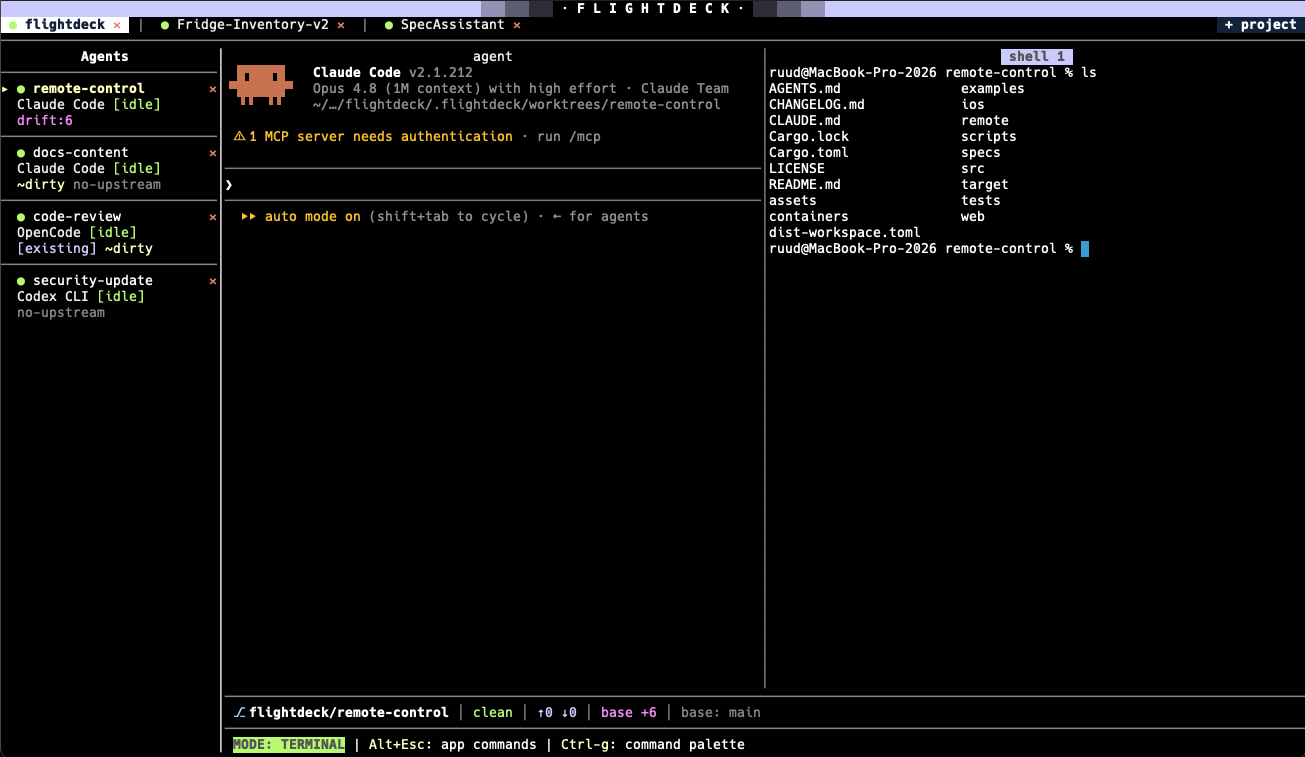
Split view — the agent and a shell in parallel columns rather than tabs.
Mouse text selection and per-column scrolling both work in split view. Toggle it
off again with Ctrl-b to return to tabs.